N
NerveAide Personal neurostimulation companion
Patient App · v3.2.3 Preview
Disconnected
Cloud not configured
Your NerveAide today

Ready for your next session.

Connect your device to see the product, assignment, battery and treatment status in one place.
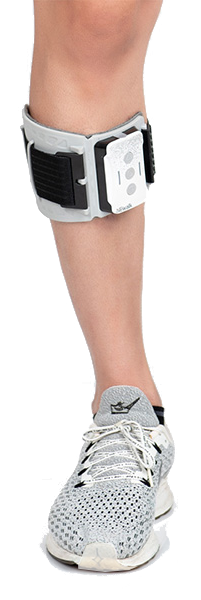
DeviceNot connectedWaiting for deviceneWALK device
Battery
—
Disconnected
CloudNot configuredTelemetry sync
Assignment—Patient/device context

Today at a glance

Live values from this app session
Walking steps0
Stim cycles0
Session time00:00
Electrode—

Care plan

Prescribed activities and progress
Today’s plan

Your rehabilitation plan

Sign in to see the plan prescribed for you.

Date — Status Signed out
✓

Sign in to view today’s plan

Your clinician-defined walking, training, massage, and future rehabilitation activities will appear here.

Progress

Progress comes from measured device/app data

Progress is read-only for the patient and is derived from validated device/app telemetry. If compatible data is not available yet, the app shows “Not measured yet” rather than treating it as zero.

Your device

Ready when you are.

Connect your NerveAide device. The app identifies the product automatically and only enables controls supported by that product.

Battery
—
Electrode connection Checking…
Current activity —
Detected device & patient

Connect a NeWalk to identify it

The app will identify the connected device automatically and show the authorized patient context here.

Not connected
1 · Choose activity

What would you like to do?

Choose a mode. You can switch at any time.

Walking —
2 · Adjust & start

Your session

Adjust intensity one step at a time, then start when you are ready.

INTENSITY
—
Device reading: Waiting…
H10 = 0 — —
STATUS
Walking ready
Play state: —
PROGRAM TIMER
Elapsed—
Remaining—
Starts after the device confirms Training or Massage is playing.
Device raw remaining/status: —
Session00:00
Walking steps0
Total cycles0
Electrode value—
Checking connection — —
Medication

Your medicines and today’s doses

Record when you take a dose. Medicines prescribed by your care team stay separate from medicines you report yourself.

This test build can show reminders while the app is open. Background reminders when the app is closed will require PWA/push notification support.
Today

Today’s scheduled doses

Use “Taken now” when you actually take the medicine. The server records the time.

Sign in to load today’s medication schedule.
Medication profile

Medicines in your record

Prescribed by your care team

You can record intake, but you cannot change the prescription here.

Other medicines you take

Add medicines, OTC products, or supplements that are not prescribed in NerveAide.

+ Add another medication
Patient-reported medicines are clearly marked as such. A clinician may review them, but review does not convert them into a prescription.
History

Recent intake

Recorded dose times help your care team compare medication timing with rehabilitation and mobility data.

AI Coach

Your AI summary

Advisory only
No reviewed AI coaching summary is available yet.
AI cannot change your medication, stimulation settings, or care plan. Clinical advice can be shown here only through the approved patient-facing workflow.
Device settings

neWALK settings

For a connected neWALK, read the current settings first. Patient-facing controls use everyday language; low-level signal controls are available in Engineering.

Sync with device
Settings have not been read yet.
How the stimulation feels

How quickly should the stimulation come in?

This does not change your walking speed. It changes how gradually the stimulation rises to the selected intensity. If the stimulation feels sudden, choose a softer start.

How many stimulation pulses are delivered each second. Most users should keep the preset unless their clinician asks them to change it.
The pulse shape changes how stimulation is delivered. This is normally a clinician or technical setting.
Show waveform options
Walking assistance

Step detection stability

This controls how easily NeWalk decides that a movement is a real step. If your knee trembles or stimulation switches on and off too easily, choose a more stable setting.

How should NeWalk decide when to start and stop?

Manual gives exact control. Automatic adapts to each step. Auto-calibrate learns your walking pattern first.

Auto-calibration: walk naturally and keep your movement consistent while NeWalk collects around 10 gait cycles. The firmware then calculates new Start and Stop values.
Stimulation timing previewPreview from saved trigger angles
Start +22° Stop −3° Mode Manual
How to read this: the green window represents when stimulation is active between the configured Start and Stop triggers. The current legacy BLE stream does not expose continuous raw foot-angle samples, so this is a settings preview—not a fake live gait signal. When the firmware stream is available, this same panel will become live.
−30°0°+50° START STOP
Start stimulationStop stimulation

What feels wrong while walking?

Choose what you observe. The app changes only the proposed trigger point; nothing is sent to the device until you press Save.

Stimulation turns ON at the wrong time Change only the green START point.
Proposed START: +22°
Stimulation turns OFF at the wrong time Change only the red STOP point.
Proposed STOP: −3°
Foot downFoot liftingFoot upFoot returning
Advanced angle values
+22°
Engineering value. Lower Start threshold moves the trigger sooner in the rising phase; higher moves it later.
−3°
Engineering value. Higher Stop threshold ends stimulation sooner; lower keeps stimulation active longer.
———

Restore device setup

If settings were changed, you can return to the last Professional setup or to Company / factory values.

Ready
Professional setup Restores the Agent / clinician profile stored inside the device firmware.
Factory / Company setup Restores Company values. Use this only when you intentionally want the device back at its factory configuration.
Professional profile: device firmware Agent values · Factory profile: Company values
Training program
Changes how gently or directly the repeated training cycle is shaped.
Massage program
Choose the massage cycle style. Keep the setting that feels comfortable and consistent.
Device preferences
Session summary

Your activity today

Live statistics from this connected session.

Active stimulation00:00
Training cycles0
Massage cycles0
Highest intensity0
Connection warnings0
Device stops0
Progress history

Your recent device use

Aggregated from synchronized session summaries on the server.

Last 7 days

Sessions—
Gait events—
Walking cycles—
Active stimulation—
Training—
Massage—

Last 30 days

Sessions—
Gait events—
Walking cycles—
Active stimulation—
Training—
Massage—

Recent sessions

Sign in to load synchronized history.
Sign in to load progress.
Gait analysis

Walking quality over time

Current firmware gait scores are read directly from the device. More advanced metrics such as cadence, toe-clearance and bilateral asymmetry will be added only when the required sensor stream is validated.

Waiting for device
Overall gait scoreNot read yetFirmware DM score · 0–10.
RhythmNot read yetFirmware AL score · 0–10.
PathNot read yetFirmware AM score · 0–10.
SmoothnessNot read yetFirmware AN score · 0–10.
Step qualityNot read yetFirmware AO score · 0–10.
Right / left asymmetryNeeds bilateral dataNot inferred from a single-sided sensor.

Session notes

Add anything you want to remember about this session.

Notes stay local in this prototype and are included only in exported session files.
Engineering workspace

All low-level controls, raw telemetry, protocol validation and cloud diagnostics stay available here. Nothing from the previous build is removed.

FULL ACCESS
Device identity & lifecycle

Device information

Hardware identity is shown immediately when available. Manufacturing, warranty and OTA fields remain explicit when the backend has not supplied them yet.

Product—
Serial number—
Model code—
BLE name—
Board / PCB versionNot reported
Hardware platformAuto-detect
Hardware versionNot reported
Firmware versionNot reported
Patient app version3.2.3-preview
Manufacturing dateNot registered
Manufacturing lotNot registered
First activationNot registered
WarrantyNot registered
OTA software update

UI is reserved for signed/version-checked OTA. Update actions remain disabled until the OTA transport and rollback rules are connected.

Professional profile

Clinician / representative setup

Save the current device settings into the firmware Agent profile. Patients can later restore this exact professional setup from Settings.

Save current settings as Professional Setup This sends the firmware Save Agent command. Use only after the device has been tuned and verified.
Ready
Advanced stimulation

Signal & protocol controls

Technical controls moved from patient Settings. Existing element IDs and command handlers are preserved.

Diagnostics

Technical information

Live device data, protocol validation, account/cloud sync and BLE diagnostics.

Live device data
Step counter—
Raw electrode value—
Firmware permission—
Last firmware status—
Last error/status—
Last raw message—
Protocol validation
Walking modeVERIFIED
Walking output phasesVERIFIED
Walking step counterVERIFIED
Training transportVERIFIED
Training runtimeVERIFIED
Massage transportVERIFIED
Massage runtimeVERIFIED
Account & cloud data sync

Sign in before a treatment session so cloud telemetry is bound to the correct patient. Device control remains local; cloud identity and synchronization are handled by the authenticated account.

Patient account
Patient identity is resolved by the server. It is no longer entered manually.
Signed out
Signed in as—
Patient ID—
Account—
Test build: credentials are sent only to the configured NerveAide server. Access and refresh tokens are kept in browser session storage and are not exported with telemetry. New patient accounts are currently created during device onboarding so the correct device assignment exists before therapy use.
Pending upload0
Preparing / sending0
Uploaded0
Failed batches0
Current device ID—
Last syncNever
EndpointNot configured
Local telemetry queue ready.
Data available from this device
BatteryAvailable
Electrode / impedanceAvailable
Stimulation start / stop eventsAvailable
IntensityAvailable
Walking step countAvailable
Program settingsReadable
Raw accelerometer streamNot exposed by this legacy BLE stream
BLE diagnostics
Notify UUID—
Write UUID—
Ready.